
QuickTextTools
QuickTextTools provides 76+ free online utilities for writers and creators to effortlessly enhance text and boost productivity directly in your.
Visit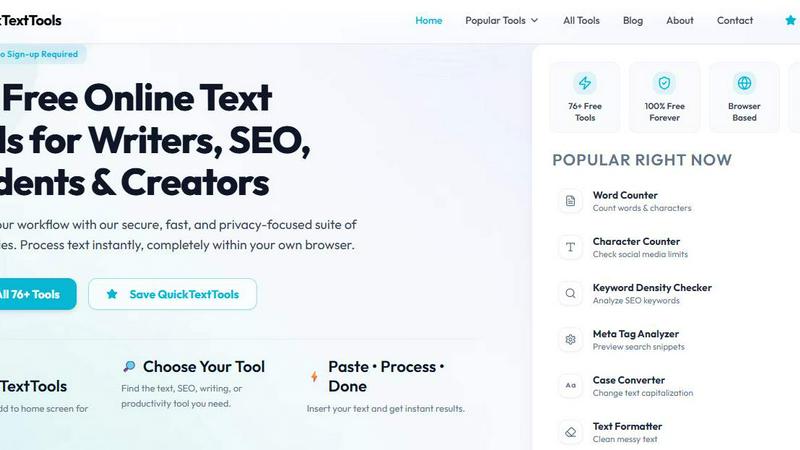
About QuickTextTools
QuickTextTools is a versatile and completely free online platform that provides a robust suite of over 76 text utilities, designed specifically for enhancing productivity across various domains including writing, marketing, development, and SEO. This user-friendly toolkit is tailored for writers, marketers, developers, students, and content creators who seek efficient solutions to streamline their workflows. By offering tools such as text formatting, SEO analysis, and keyword management, QuickTextTools makes it easy to perform complex text manipulations without needing extensive technical knowledge. The platform operates directly in your browser, ensuring fast access and eliminating the need for software downloads or complicated setups. Users can quickly clean messy text, analyze SEO meta tags, format case styles, and improve their overall writing process. QuickTextTools stands out by promoting a privacy-focused experience, providing practical solutions that empower users to work smarter and more efficiently, all while maintaining a secure environment.
Features of QuickTextTools
Text Formatter
The Text Formatter tool allows users to clean up messy text by removing unwanted characters, excess spaces, and formatting inconsistencies. This feature is essential for anyone looking to present polished content effortlessly.
Keyword Density Checker
This utility analyzes the frequency of keywords within a text, helping users optimize their content for search engines. By understanding keyword density, marketers and SEO professionals can enhance their strategies to improve visibility online.
Meta Tag Analyzer
The Meta Tag Analyzer provides users with the ability to preview and analyze SEO meta tags, including titles and descriptions. This feature is crucial for improving search engine rankings and ensuring that content is indexed effectively.
Case Converter
The Case Converter tool enables users to easily switch between different text case formats—uppercase, lowercase, or title case. This feature is particularly useful for writers and developers who need consistent formatting across their documents.
Use Cases of QuickTextTools
Content Creation for Writers
Writers can utilize QuickTextTools to streamline their content creation process. With tools like the Word Counter and Text Formatter, they can ensure their work is polished and adheres to length guidelines effortlessly.
SEO Optimization for Marketers
Marketers can leverage the Keyword Density Checker and Meta Tag Analyzer to enhance their SEO strategies. By analyzing content, they can make informed adjustments to boost their search engine rankings and attract more traffic.
Text Analysis for Students
Students can benefit from QuickTextTools by using utilities such as the Character Counter and Reading Time Calculator. These tools help manage essays and presentations, ensuring that they meet academic requirements for length and clarity.
Development Support for Programmers
Developers can access tools like the JSON Formatter and URL Encoder to streamline their coding processes. QuickTextTools offers essential utilities that help in formatting and preparing data for web applications without hassle.
Frequently Asked Questions
Is QuickTextTools really free?
Yes, QuickTextTools is completely free to use, with no hidden costs or subscription fees. Users can access all features without needing to sign up.
Do I need to download anything to use QuickTextTools?
No, QuickTextTools operates entirely in your web browser. There is no need for any software downloads or complicated installations, making it easy to access anytime.
How does QuickTextTools ensure privacy?
QuickTextTools is committed to user privacy. All tools are designed to operate within the browser, meaning your text and data do not get stored or processed on external servers.
Can I use QuickTextTools on mobile devices?
Yes, QuickTextTools is designed to be responsive and works seamlessly on mobile devices, allowing users to access tools and utilities from anywhere at any time.
Explore more in this category:
Similar to QuickTextTools

Todowing
Chrome extension for Todoist that nests sub-tasks inline in Today, Upcoming, Filter, and Label views. Free tier, $19.99 one-time unlock.

LightScreen
Free light screen tool online. Turn any display into a flashlight, ambient light, or solid-color screen. No download or sign-up.

ReadyHermes
Your own hosted Hermes Agent, ready in seconds

FreeVideoGenerator
Free AI video generator: turn text prompts and photos into video clips with Sora 2, Veo 3.1, Wan and more. Free starter credits, no watermark download

Novastart
Apps and files on an infinite canvas where people and AI agents work together.

ButterShare
Transfer files between iPhone, Android, Windows, and Mac directly from your browser. Free, secure, and private. No apps, cloud storage, or signup.
AI Email Filter
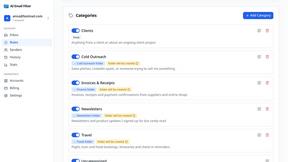
AI Email Filter sorts incoming mail into folders using plain-language prompts you write. Works with any IMAP mailbox; bring your own LLM if you want.