
ButterShare
Transfer files between iPhone, Android, Windows, and Mac directly from your browser. Free, secure, and private. No apps, cloud storage, or signup.
Visit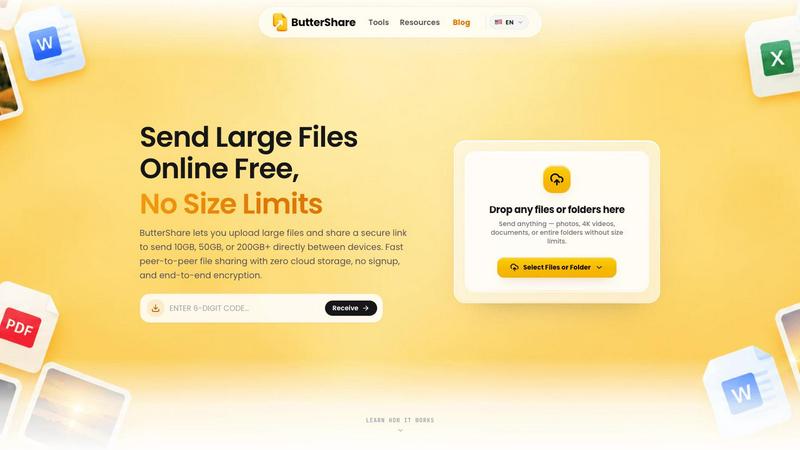
About ButterShare
ButterShare is a free, secure, browser-based peer-to-peer file sharing tool that makes transferring files between devices simple.
Whether you're sending photos from an Android phone to a Windows PC, transferring documents from an iPhone to a laptop, or sharing files between Mac and Windows, ButterShare lets you do it without installing apps, creating accounts, or uploading files to cloud storage.
How ButterShare works:
- Open buttershare.com in your browser.
- Select the files or folders you want to share.
- Generate a secure sharing link or QR code.
- Send the link to the recipient, who can receive the files directly in their browser.
Key features:
- Cross-platform file transfers between iPhone, Android, Windows, Mac, and Linux.
- Peer-to-peer file sharing powered by WebRTC.
- Encrypted connections for private file transfers.
- No account registration or software installation required.
- No permanent cloud storage of transferred files.
- Easy sharing through links and QR codes.
- Free to use.
ButterShare is built for students, professionals, freelancers, creators, and anyone who wants a simple way to send files from one device to another.
Explore more in this category:
Similar to ButterShare
Bolts
AI employees with a brain that think, remember your business and work 24/7 on their own cloud computers.
Toolbox
96 private Mac tools in one app: compress video, sign PDFs, remove backgrounds, transcribe. Offline, no account, pay once.

leadmatically
Find More Leads. Grow Your Business.

Safe Outreach
AI-powered platform that evaluates the safety of LinkedIn automation tools and helps reduce the risk of account restrictions.


Emailyy
Free email tools for signatures, subject lines, HTML previews, word counts, and email headers. Browser-based, simple to use, and no signup required.
TroveKey
Search tabs, Chrome bookmarks and history, run browser commands, and save webpages and social posts locally—no account.

Uniclip
Clip pages, take full-page screenshots and batch-capture list data to Notion, Feishu, Obsidian, Markdown, CSV or JSON.