
LoadTester
LoadTester is a modern browser-based HTTP and API load testing tool that delivers real-time performance analytics without requiring any.
Visit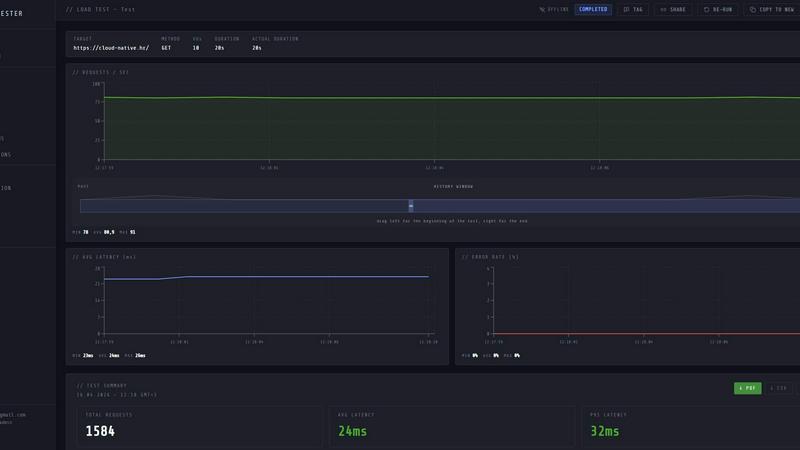
About LoadTester
LoadTester is a modern HTTP and API load testing tool built by Cloud Native d.o.o. for engineering teams that need repeatable performance checks. It runs distributed load tests from your browser or CI/CD pipeline, with live analytics, p95/error-rate thresholds, scheduled baselines, and run-to-run comparisons without any infrastructure to manage. LoadTester helps developers and teams run HTTP and API load tests without setting up load testing infrastructure. Create a test, choose virtual users or requests per second, monitor live latency and error rates, review completed results, compare runs, and catch performance regressions before users notice. It includes exports, scheduled tests, API access, and workflow integrations for teams that want simple, repeatable performance checks. The platform is built for scale, performance, and reliability, supporting up to 10,000 requests per second and 10,000 virtual users per test with a cold start time of under three seconds. LoadTester is designed for engineering teams who want to ship with confidence, prove capacity before launch, and catch performance regressions early. It removes the painful parts of performance testing while keeping the workflows developers actually care about, making it an essential tool for modern software development and deployment pipelines.
Features of LoadTester
Instant Execution, Distributed by Default
Start distributed load tests in seconds without any infrastructure setup, worker orchestration, or scheduling headaches. Your team focuses on results while LoadTester handles worker scaling, infrastructure coordination, and execution flow. With a cold start time of under three seconds, zero infrastructure to provision, and automatic worker scaling, you can launch tests instantly from the dashboard or through your CI/CD pipeline.
Live Analytics and Real-Time Monitoring
Watch requests, latency, failures, throughput, and bottlenecks in real time while your test is running. The live console displays throughput, latency, active users, and errors updating during the run, with clear summaries showing total requests, average latency, p95, data sent, and data received. Latency distribution charts for p50, p95, and p99 update in real time, giving you immediate visibility into system performance.
Smart Auto-Stop with Thresholds
Set failure or latency thresholds and automatically stop tests when things go sideways. Configure guardrails for p95 latency, error rates, and regression baselines, with auto-stop on threshold breach. You can also set up notifications to Slack and email when thresholds are crossed, and configure webhooks to post result links to release bots, ensuring your team is always informed about performance issues.
CI/CD Ready with Integrations
Run tests on every deploy with seamless CI/CD integration, webhooks, Slack and email alerts, and API access for workflow automation. LoadTester supports scheduled tests, exports to PDF, CSV, or JSON, and provides shareable output for team collaboration. The platform integrates directly into your development workflow, making it easy to catch performance regressions before they reach production.
Use Cases of LoadTester
Pre-Deployment Performance Validation
Run load tests as part of your CI/CD pipeline to validate that new code deployments do not introduce performance regressions. Set up automated tests that run on every pull request or deployment, with threshold-based auto-stop to catch issues immediately. Compare run results against baselines to ensure p95 latency and error rates remain within acceptable limits before merging code to production.
Capacity Planning and Spike Testing
Simulate traffic spikes to understand how your application behaves under sudden load increases. Create spike tests that ramp up to high request rates or virtual user counts, then monitor how your system handles the surge. Use the results to determine if your infrastructure can handle peak traffic events like product launches, marketing campaigns, or seasonal demand increases.
API Endpoint Benchmarking
Benchmark individual API endpoints to establish performance baselines and track changes over time. Run targeted tests against specific routes with different payload sizes, authentication methods, and request patterns. Compare historical run data to identify performance degradation caused by code changes, database query modifications, or infrastructure adjustments.
Scheduled Baseline Monitoring
Set up recurring load tests that run on a schedule to continuously monitor application performance. Configure daily or weekly tests that automatically execute and compare results against established baselines. Receive alerts when performance metrics deviate from expected ranges, enabling your team to proactively address issues before they impact end users.
Frequently Asked Questions
How does LoadTester handle infrastructure and scaling?
LoadTester manages all infrastructure automatically. There is no need to provision servers, configure workers, or manage scaling. The platform handles worker coordination and infrastructure execution, starting tests in under three seconds with automatic worker scaling. You simply create a test, choose your parameters, and launch it from the dashboard or CI/CD pipeline.
What types of load tests can I run with LoadTester?
You can run HTTP and API load tests using either virtual users or requests per second mode. The platform supports GET, POST, PUT, and DELETE methods against any HTTP or API endpoint. You can configure test duration, rate limits, and virtual user counts up to 10,000 per test, with a maximum throughput of 10,000 requests per second.
Can I integrate LoadTester into my existing CI/CD workflow?
Yes, LoadTester is designed for seamless CI/CD integration. You can trigger tests through API access, configure webhooks for test completion notifications, and set up scheduled tests that run automatically. The platform provides export options for PDF, CSV, and JSON results, making it easy to include performance data in your existing reporting and alerting workflows.
How does LoadTester handle test failures and performance regressions?
LoadTester provides smart auto-stop capabilities with configurable thresholds for p95 latency, error rates, and regression baselines. You can set up guardrails that automatically stop tests when thresholds are breached, preventing unnecessary resource consumption. The platform also supports notifications to Slack and email when performance issues are detected, and can compare current run results against historical baselines to identify regressions.
Similar to LoadTester



PNG to SVG
Convert PNG and JPG images to SVG, compress images, and switch between popular formats directly in your browser. No uploads, no signup, and no waterma

xDevTools
Fast, private developer tools. 1000+ utilities run locally. Format, encode, hash, and analyze.


Blur & Unblur AI
Free online face blur and unblur tool with local browser processing.

WordPalette Generator
WordPalette Generator instantly creates a full brand identity system from any word or image, running entirely in your browser.