
Prompt Builder
Prompt Builder instantly creates, refines, and manages AI prompts for models like ChatGPT and Gemini in one workspace.
Visit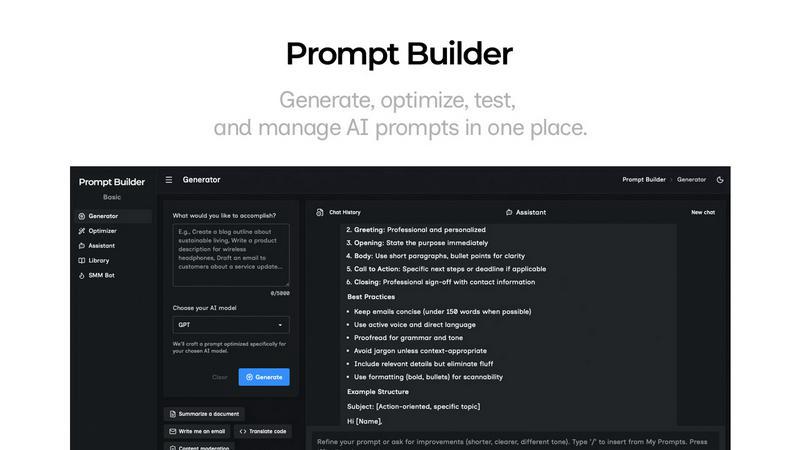
About Prompt Builder
Prompt Builder is a comprehensive prompt engineering workspace designed to streamline the entire process of creating, testing, and managing AI prompts. It addresses the common pain points of prompt engineering by providing a unified platform where users can transform a simple idea into a polished, model-optimized prompt in seconds. The core value proposition is eliminating the inefficiency of manually rewriting prompts for different AI models and losing track of successful versions across disparate chat threads. It is built for professionals, content creators, developers, and anyone who regularly uses large language models (LLMs) and seeks consistent, high-quality outputs. By offering tools tuned for specific models like GPT, Claude, Gemini, and Llama, Prompt Builder ensures users get better results with fewer retries, turning hours of trial and error into a minutes-long, organized workflow. Users can start with a draft, refine it in an integrated chat, save or pin the best versions to a personal library, and execute them anytime, all within a single interface.
Features of Prompt Builder
Prompt Generator
The Prompt Generator is the starting point for creating new prompts. Users simply describe their task in plain English and select their target AI model, such as Gemini, Claude, or GPT. The tool then generates a professional-grade, model-optimized prompt draft that incorporates the appropriate structure, constraints, and output format for that specific model. This foundational prompt can be immediately refined within the built-in chat workspace, allowing for rapid iteration. The best versions can be saved or pinned directly to your personal Library for future reuse, ensuring you never lose an effective prompt.
Prompt Assistant
The Prompt Assistant is an integrated chat workspace that allows users to test and run their prompts without ever leaving Prompt Builder. It features an assistant model selector, enabling you to run prompts on various AI models like Grok, Gemini, GPT, and DeepSeek. You can insert prompts directly from the Generator, Optimizer, or your Library to test them, iterate with follow-up questions, and see the results in real-time. This centralized testing environment keeps all your prompt iterations and their corresponding outputs organized in one place, eliminating the need to jump between different AI platforms.
Prompt Optimizer
The Prompt Optimizer is designed to enhance existing prompts. Users can paste any prompt—whether from an external source or selected from their Library—and the Optimizer will analyze and improve it. It provides structured enhancements focusing on clarity, adding constraints, defining output formats, and incorporating examples to make the prompt more effective. The optimization history is auto-saved, and favorite versions can be pinned. With one click, you can run the optimized prompt in the Assistant to immediately test its improved performance.
Prompt Library
The Prompt Library serves as the central hub for organizing and reusing prompts. It consists of two main sections: "My Prompts" for your personal saved, pinned, and edited prompts, and "Community Prompts" where you can explore templates shared by other users. The library includes powerful search and filtering options by category and target model. Any saved prompt can be run in the Assistant as a new chat with a single click, making it easy to deploy proven prompts across different projects and use cases, thereby building a valuable, reusable asset.
Use Cases of Prompt Builder
Content Creation and Marketing
Marketing professionals and content creators can use Prompt Builder to generate and refine prompts for blog posts, social media content, ad copy, and email campaigns. The SMM Bot feature specifically allows for generating platform-ready social posts for X, LinkedIn, and Instagram, complete with tone adjustments and CTAs. By saving successful prompt templates for different content types and audiences in the Library, teams can ensure brand consistency and dramatically reduce the time spent on content ideation and drafting.
Software Development and Technical Writing
Developers and technical writers can leverage Prompt Builder to create precise prompts for code generation, debugging, documentation writing, and API explanation. The ability to optimize a prompt for a specific model like Claude (known for coding) or GPT ensures higher-quality, more relevant outputs. Prompts for generating code snippets, writing technical tutorials, or creating system documentation can be saved, versioned, and reused, making the development workflow more efficient and standardized.
Research and Data Analysis
Researchers, analysts, and students can utilize the platform to craft prompts for summarizing academic papers, analyzing datasets, generating literature reviews, or formulating hypotheses. The Optimizer helps add necessary constraints and output formats (e.g., "create a table" or "list key points") to get structured, actionable insights. By testing these refined prompts in the Assistant with different models, users can compare outputs and pin the most accurate versions to their Library for repeated use in ongoing projects.
Business Process Automation
Business professionals and entrepreneurs can employ Prompt Builder to automate routine tasks such as drafting emails, generating reports, creating meeting agendas, or preparing customer support responses. By building a library of optimized prompts for these repetitive functions, employees can execute them in seconds through the Assistant, ensuring consistency and freeing up time for higher-value work. The model-specific tuning also guarantees that prompts work effectively with the company's chosen AI tools.
Frequently Asked Questions
What AI models does Prompt Builder work with?
Prompt Builder is compatible with a wide range of popular large language models. This includes OpenAI's GPT models, Anthropic's Claude, Google's Gemini, Meta's Llama, Mistral AI, DeepSeek, xAI's Grok, Perplexity, and Cohere. The Prompt Generator creates prompts specifically tuned for the model you select, and the Assistant allows you to run and test prompts using many of these models directly within the platform.
Is there a free plan available?
Yes, Prompt Builder offers a free tier to get started. This plan includes 25 assistant requests per month, allowing you to generate, test, and run prompts without requiring a credit card. This is sufficient for individuals to explore the core features, including the Prompt Generator, basic use of the Assistant, and access to the Library, before deciding to upgrade to a paid plan for higher usage limits and advanced features.
How does the Prompt Optimizer improve my existing prompts?
The Prompt Optimizer enhances prompts through structured improvements. It analyzes your input for clarity, adds or refines constraints to narrow the focus, suggests a more specific output format (like JSON, a list, or a paragraph), and can incorporate examples to guide the AI. This process transforms vague or generic prompts into precise, well-structured instructions that are more likely to generate the desired high-quality response from the AI model.
Can I share and use prompts created by others?
Absolutely. Prompt Builder includes a Community Prompts section within the Prompt Library. Here, you can browse and search through a collection of prompts and templates shared by other users for various use cases and models. You can add any community prompt you like to your own Library with one click, where you can then run, edit, and customize it for your specific needs, fostering collaboration and saving you time.
Similar to Prompt Builder

WidgIq
Provide an AI-powered customer support widget for your website





ContextBolt SEO
Research keywords, competitors, backlinks and AI visibility in Claude or Codex. Keep the findings in your SEO dashboard.
