
KPI Studio
KPI Studio transforms raw data into stunning video animations in seconds, simplifying your workflow without the need for design tools.
Visit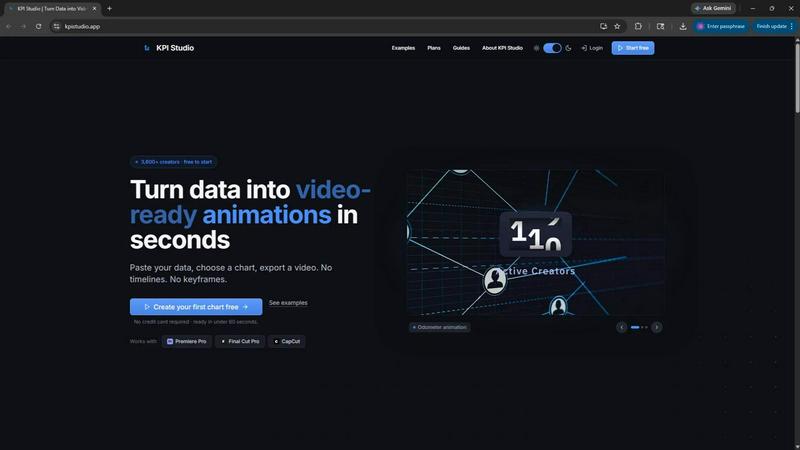
About KPI Studio
KPI Studio is a revolutionary tool designed specifically for data-driven video creators who require dynamic charts and visuals in their content but lack the time or expertise for traditional motion design. In the fast-paced world of video production, the process of creating engaging visuals can often be cumbersome and inefficient. Traditional methods, such as using static screenshots or hiring freelancers, can lead to delays and inflated costs. KPI Studio simplifies this workflow by enabling users to input their data, select a chart type, and export a fully animated visual in under 60 seconds. With no need for timelines or keyframes, creators can seamlessly integrate these visuals into their editing software like Premiere Pro, Final Cut, and CapCut. This tool is built for creators facing tight deadlines, ensuring they have the charts they need, when they need them. Whether for YouTube videos, social media content, or professional presentations, KPI Studio transforms data into stunning, video-ready animations effortlessly.
Features of KPI Studio
Fast Data Input
With KPI Studio, users can simply paste their data into the platform, selecting from various chart types. This streamlined process eliminates the need for complex design tools, allowing creators to focus on their content rather than the mechanics of chart design.
Animated Visuals
KPI Studio specializes in generating animated charts that capture attention. From growth counters to dynamic bar and line charts, these visuals engage viewers and enhance message retention, making video content more impactful.
Seamless Export Options
Users can export their animations in multiple formats, including MP4, GIF, MOV, and PNG with transparent backgrounds. This flexibility ensures that the visuals can be easily integrated into any video editing software without additional editing steps.
JSON Export for Advanced Workflows
For those with more complex needs, KPI Studio offers a JSON export feature. This allows for deeper editing and integration into custom workflows, making it suitable for advanced users who require tailored solutions for their projects.
Use Cases of KPI Studio
YouTube Content Creation
YouTube creators can utilize KPI Studio to generate eye-catching visuals that enhance their storytelling. By transforming raw data into animated charts, they can explain trends or metrics more effectively, increasing viewer engagement and retention.
Social Media Marketing
Marketing professionals can leverage KPI Studio to create compelling animated visuals for social media posts. These eye-catching animations can drive higher engagement rates, making posts stand out in crowded feeds and attracting more followers.
Financial Reporting
Businesses looking to present financial data in a clear and engaging way can use KPI Studio to create animated charts. These visuals can help stakeholders understand key metrics at a glance, making reports more effective and easier to digest.
Educational Content
Educators and eLearning developers can benefit from KPI Studio by incorporating animated KPIs into their materials. By presenting complex data visually, they can facilitate better understanding and retention of information among learners.
Frequently Asked Questions
How quickly can I create an animated visual with KPI Studio?
You can create an animated visual in under 60 seconds by simply pasting your data, customizing the chart, and exporting it. The process is designed to be fast and efficient for busy creators.
What formats can I export my animations in?
KPI Studio allows you to export your animations in various formats including MP4, GIF, MOV, and PNG with transparent backgrounds, making it easy to integrate into different video editing software.
Is there a free trial available for KPI Studio?
Yes, KPI Studio offers a free plan that allows you to start creating animations without the need for a credit card. This plan includes unlimited PNG exports and three animated exports.
Can I edit my charts after exporting?
If your data changes, you can simply re-export your charts with the updated information. KPI Studio's workflow allows for quick adjustments without the need for complex rework or editing.
Similar to KPI Studio
VideoToScript
Turn TikTok, Reels, Shorts, Facebook videos, audio, and video into accurate timestamped transcripts with TXT, SRT, and VTT exports.

UGCad AI
AI UGC video ad Generator which Turn a URL, prompt, or template into a ready video ads

StopScroll
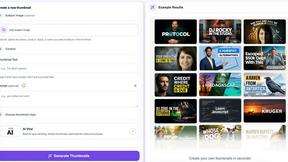
AI YouTube thumbnail maker that helps creators generate high-click thumbnails faster.



Sparqo AI
Sparqo AI is your AI marketing team that plans, writes, and distributes content across SEO and Reddit for you to approve.

Masset
Masset is the AI-powered content hub that centralizes your business content so your team and AI tools always tell the right story.