
Clean Image AI-Powered Photo Cleanup
Clean Image is a private AI photo cleanup tool that removes text, logos, and objects locally in your browser for instant, secure editing.
Visit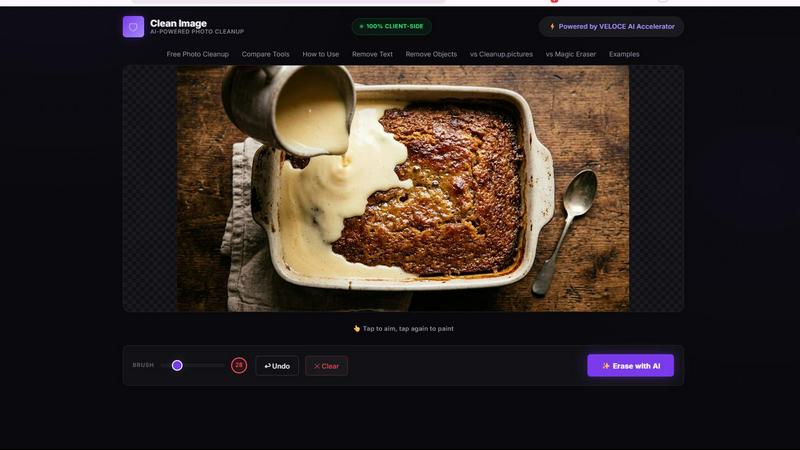
About Clean Image AI-Powered Photo Cleanup
Clean Image is a free, browser-based AI photo cleanup tool that empowers users to remove unwanted elements from their images with unprecedented ease and privacy. Unlike traditional photo editing software that requires uploads to external servers or complex desktop installations, Clean Image operates entirely within your browser using cutting-edge web technologies. The tool is designed for anyone who needs to quickly clean up images: content creators removing watermarks, marketers erasing logos from stock photos, photographers eliminating date stamps, or individuals tidying up personal snapshots. The core value proposition is threefold: it is completely free, it processes everything locally on your device, and it delivers professional-grade results. Powered by the ONNX Runtime and the OpenCV LaMa inpainting model, Clean Image uses artificial intelligence to reconstruct the areas you brush over by intelligently analyzing and filling them with surrounding pixel data. This means that text, logos, overlays, small blemishes, and timestamps can be removed seamlessly, especially on clean backgrounds. The tool is optimized for speed with the VELOCE AI Accelerator, and after an initial one-time model download of approximately 89 MB, future visits are instant with zero data usage. No accounts, no subscriptions, and no uploads mean your images never leave your device, making Clean Image a privacy-first solution for both personal and commercial projects.
Features of Clean Image AI-Powered Photo Cleanup
100% Private Client-Side Processing
All image processing happens locally within your browser using ONNX Runtime Web and WebAssembly. This means your images are never uploaded to any server, transmitted over the internet, or stored on external infrastructure. Your data remains entirely on your device, providing absolute privacy and security. This is a critical feature for professionals handling sensitive or copyrighted material, as it eliminates any risk of data breaches or unauthorized access during the cleanup process.
AI-Powered Inpainting with LaMa Model
Clean Image leverages the advanced OpenCV LaMa neural network for its inpainting capabilities. When you brush over an area to remove text or an object, the AI does not simply blur or clone stamp the region. Instead, it reconstructs the missing pixels by analyzing the surrounding context, textures, colors, and patterns. This results in a natural, seamless fill that blends perfectly with the rest of the image, making the removal virtually undetectable, especially on clean backgrounds.
Instant Performance After Initial Load
The first time you use Clean Image, the AI model downloads once and is cached in your browser. This initial download is approximately 89 MB, which is a one-time occurrence. On all subsequent visits, the model loads instantly from the browser cache with zero additional data usage. Combined with the VELOCE AI Accelerator, this ensures that the tool is responsive and fast, allowing you to erase unwanted elements with minimal waiting time, even on complex images.
Simple Brush and Erase Workflow
The user interface is designed for maximum simplicity and efficiency. You use a brush tool to paint directly over any element you want to remove, such as text overlays, logos, timestamps, or small blemishes. The brush size can be adjusted for precision. Once you have marked the area, a single click on the Erase button triggers the AI inpainting process. This straightforward, two-step workflow eliminates the need for complex layer masks or selection tools, making professional photo cleanup accessible to anyone.
Use Cases of Clean Image AI-Powered Photo Cleanup
Removing Watermarks and Logos for Content Creation
Content creators and marketers frequently need to use images that have distracting watermarks or branding logos. Clean Image allows you to upload the image, brush over the unwanted mark, and erase it in seconds. Because the AI reconstructs the background naturally, the final image looks clean and professional. This is ideal for creating social media graphics, blog post headers, or presentation slides where you need unmarked visuals without paying for premium stock images.
Erasing Date Stamps and Timestamps from Photos
Many digital cameras and smartphones automatically embed date stamps or timestamps onto photos, which can detract from the aesthetic quality of an image. Clean Image provides a quick solution to remove these stamps without needing to crop the image or use complex editing software. By brushing over the date and hitting erase, the AI fills the area with the surrounding background, restoring the image to its original, uncluttered state. This is perfect for photographers preparing images for prints or portfolios.
Cleaning Up Screenshots for Documentation
Technical writers, software developers, and educators often use screenshots in their documentation or tutorials. These screenshots frequently contain unwanted UI elements, tooltips, notification badges, or personal information that should not be shared. Clean Image enables you to quickly clean up screenshots by removing these distracting or sensitive elements. The tool is particularly effective on the clean, solid backgrounds typical of user interfaces, making it a fast and reliable alternative to manual pixel editing.
Removing Small Blemishes and Objects from Personal Photos
For personal photo editing, Clean Image can be used to remove small, unwanted objects or blemishes that spoil an otherwise great picture. This includes things like litter on a beach, a stray hair on a face, a power line in a landscape shot, or a small spot on a product photo. The AI inpainting model is highly effective at filling these small areas with contextually appropriate pixels, allowing you to perfect your images for sharing on social media or printing without needing a subscription to a full-featured photo editor.
Frequently Asked Questions
What file types does Clean Image support?
Clean Image supports the most common image file formats including PNG, JPG, and WebP. These formats cover the vast majority of use cases for photo cleanup, from standard photographs to web graphics. You can simply drag and drop your file or use the browse option to select it from your device. There is no need to convert your files before using the tool.
Is Clean Image really free to use with no limits?
Yes, Clean Image is completely free to use with no subscriptions, no hidden fees, and no account creation required. There are no caps on the number of images you can process or the number of erasures you can perform. The tool is designed to be accessible to everyone for both personal and commercial projects. The only requirement is a modern web browser that supports WebAssembly.
How does the AI ensure my images are private and secure?
Privacy is a core design principle of Clean Image. All processing is performed 100% client-side using ONNX Runtime Web and WebAssembly. This means your image data never leaves your computer. It is not uploaded to any server, stored in any cloud, or transmitted over the internet. The entire AI model runs locally in your browser, ensuring that your images and the results are only accessible to you.
Does Clean Image work on complex backgrounds or large objects?
Clean Image delivers the best results on clean, uniform backgrounds with text, logos, or small blemishes to remove. For example, removing a text overlay from a solid color background or a date stamp from a clear sky works exceptionally well. Performance on complex, textured backgrounds or for removing large objects may be less predictable. The AI is optimized for inpainting small to medium areas where the surrounding pixels provide enough context for a natural reconstruction.
Explore more in this category:
Similar to Clean Image AI-Powered Photo Cleanup
AIPetGen
AIPetGen turns a photo of your dog, cat, or other pet, or a written description, into a new picture or a short animation.

Chatit Me - Free Random Chat Alternative
Chat with random strangers online for free on ChatIt.me. Enjoy safe, anonymous, and instant 1-on-1 conversations with people worldwide
VidhyaGen
Fast, free, and privacy-first browser tool to convert, crop, resize, and compress images locally without server uploads.

StyleCut
StyleCut is an AI hairstyle changer that lets you preview 70+ haircut ideas on your own photo before visiting the salon.

Presentation Intelligence
AI-native presentation and visual content platform that turns prompts, documents, images, videos, and data into polished, shareable decks.

DigiCakey
Create and send personalized digital cakes with custom frosting, fruit, candles, cards, and drawings.


401k Calculator
401k Calculator.info is a free online tool to estimate retirement savings, employer match, and future 401(k) growth for smarter financial planning.