
Cece AI
Cece AI streamlines your small business operations by managing emails, scheduling, invoicing, and follow-ups, allowing you to focus on growth.
Visit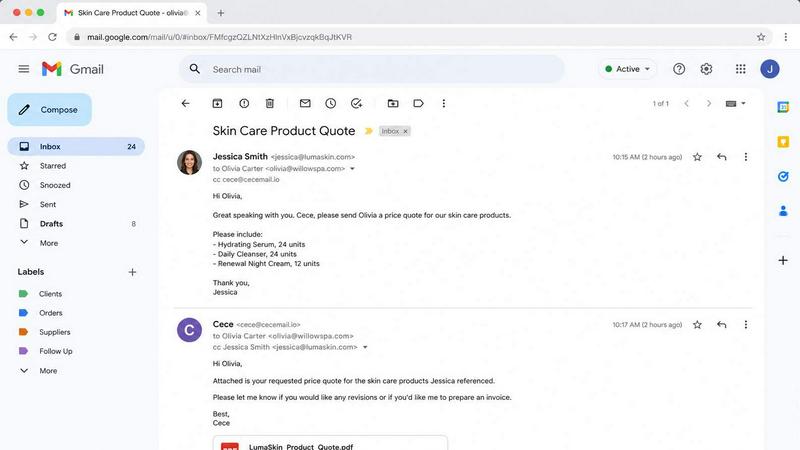
About Cece AI
Cece AI is an advanced AI executive assistant designed specifically for small business owners overwhelmed by the daily grind of emails, administrative tasks, and unfinished follow-ups. It streamlines operations by allowing users to set up their calendars, business profiles, pricing structures, and personal preferences through an intuitive dashboard. By simply CC'ing Cece on an email, users can enhance productivity as Cece takes over scheduling meetings, responding to clients, creating quotes, sending invoices, tracking follow-ups, and managing reminders. This innovative tool operates directly within the user's inbox, transforming chaotic email threads into organized tasks that are completed more quickly, resulting in faster responses and fewer missed opportunities. Cece AI is not just another chatbot; it is a practical solution for small businesses seeking to reduce administrative burdens, improve customer communication, and reclaim valuable time.
Features of Cece AI
Email Management
Cece AI expertly manages your inbox by sorting through daily emails, identifying urgent tasks, and responding to clients on your behalf. This feature ensures that important messages are never overlooked, allowing you to focus on more critical aspects of your business.
Calendar Integration
With seamless calendar integration, Cece AI coordinates meeting schedules directly from your email conversations. By checking availability and sending out calendar invites with meeting links, Cece simplifies the scheduling process, saving you time and reducing the hassle of back-and-forth emails.
Document Generation
Cece AI can quickly generate professional documents such as quotes and invoices, complete with your branding and terms. This feature allows users to respond to pricing requests or client inquiries instantly, enhancing professionalism and customer satisfaction.
Reminder and Follow-up Management
Cece AI takes the stress out of follow-ups by automatically reminding you of pending tasks and sending friendly nudges to clients. This feature ensures that no task falls through the cracks, helping you maintain strong relationships with customers and keeping your workflows on track.
Use Cases of Cece AI
Small Business Email Overload
For small business owners swamped with 50 to 200 emails daily, Cece AI effectively filters and prioritizes messages. By managing routine responses and administrative tasks, it allows business owners to focus on the core activities that drive growth.
Scheduling Meetings with Clients
When client meetings need to be scheduled, Cece AI simplifies the process by automatically proposing times based on your availability. This feature minimizes the time spent coordinating schedules, allowing you to spend more time on actual meetings.
Generating Professional Quotes
When a client requests pricing information, Cece AI can instantly create a polished quote based on your pre-set pricing structure. This quick turnaround not only impresses clients but also speeds up the sales process.
Managing Follow-ups
Cece AI keeps track of all your follow-ups and sends reminders to ensure you stay on top of client communications. This proactive approach prevents missed opportunities and fosters better client relationships through timely follow-ups.
Frequently Asked Questions
How does Cece AI integrate with my existing email system?
Cece AI works seamlessly within your existing email platform, primarily Gmail. By CC'ing Cece on your emails, it leverages your email threads to manage tasks without requiring a separate application.
Is Cece AI suitable for all types of small businesses?
Yes, Cece AI is versatile and adaptable, making it suitable for various industries including trades, professional services, and more. It can handle any small business that relies on email for communication and operations.
How quickly can I set up Cece AI for my business?
Setting up Cece AI is quick and easy, typically taking just a few minutes to configure your calendar, business profile, and preferences. After setup, you can start using Cece immediately for daily operations.
What level of support is available if I encounter issues?
Cece AI offers customer support to assist users with any technical issues or questions that may arise. You can reach out via the provided contact methods for prompt assistance and guidance.
Explore more in this category:
Similar to Cece AI

Product Launch Checklist
A free launch checklist for SaaS, apps, AI tools and more. Every step says why it matters and when you can skip it.
Kody Tools
Free collection of online developer utilities, code formatters, and digital converters designed to streamline your daily workflow.

Forms Plugin
The #1 Native Form Builder Plugin for Framer - No Code, No Embeds, No External Platforms.

tallycounterweb.com
Tally Counter is a simple online counting tool for tracking attendance, workouts, inventory, sports scores, visitors, and everyday activities.

iHatePosting
Create once, tailor for each platform, and schedule posts across 14 social networks from one simple dashboard.
PDFWix
PDFWix is a free online PDF toolkit designed to make everyday PDF tasks simple, fast, and private.
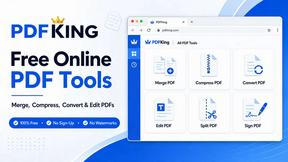
PDFKing
PDFKing is a free online PDF toolkit designed to make everyday document tasks simple, fast, and accessible. It brings essential PDF tools together in